Hi Guys,
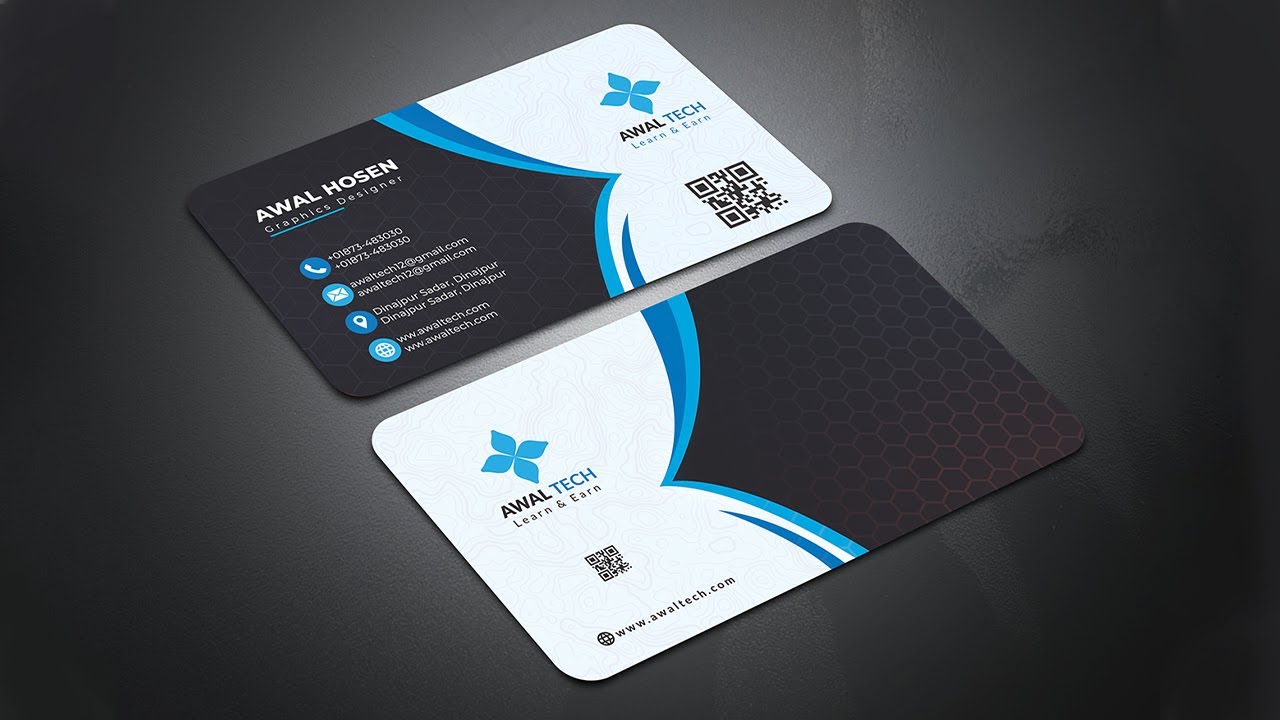
In This Video, I will explain the How to create a professional visiting card design in photoshop. The design of visiting card or business card is shown through adobe photoshop. I hope you like it. Here is the work of different tools of adobe photoshop. The video gives the basic idea of adobe photoshop. Hope you will benefit.
A Complete Guide to Professional Business Card Design: Step-by-Step Analysis Based on a Modern Creative Example
In today’s digital and competitive business environment, personal branding plays a vital role in professional success. One of the most effective tools for building a strong professional identity is a well-designed business card. Even in the age of social media and digital portfolios, business cards remain a powerful symbol of credibility, trust, and professionalism. The image provided shows a modern, elegant, and visually appealing business card design for “AWAL TECH – Learn & Earn.” This design reflects creativity, clarity, and strategic branding. In this article, we will analyze this business card step by step and explain how such a design can inspire bloggers, designers, freelancers, and entrepreneurs to build their own professional identity.
Step 1: Understanding the Purpose of a Business Card
Before designing or analyzing a business card, it is important to understand its main purpose. A business card is not just a piece of printed paper; it represents your personal or company brand. It carries essential information such as your name, profession, contact details, and digital presence. In the given image, the card clearly communicates that the owner is a graphics designer associated with AWAL TECH. This clarity helps clients and partners instantly understand the professional role of the cardholder.
For bloggers and digital entrepreneurs, a business card also works as an offline marketing tool. When you attend seminars, workshops, or meetings, you can easily share your identity. This creates long-term connections and improves trust. Therefore, the first step in creating a professional business card is defining its purpose and target audience.
Step 2: Observing the Overall Layout and Structure
The second step is to analyze the layout and structure of the design. The provided image shows a dual-sided business card with rounded corners and a clean, balanced layout. The design is divided into dark and light sections, which creates a strong visual contrast. This contrast helps highlight important elements such as the logo, name, and contact details.
The layout is well-organized and symmetrical. Each section has enough white space, making the content easy to read. The curved blue lines in the center connect both sides of the card visually. This creates harmony and consistency. A good layout ensures that the card looks professional and does not feel crowded or confusing.
For your Blogger website, you can learn that layout planning is essential before starting any design project. Whether it is a website, logo, or business card, structure always comes first.
Step 3: Analyzing Color Scheme and Visual Balance
Color plays a major role in branding and emotional communication. In this design, black, white, and blue are the dominant colors. Black represents professionalism, power, and elegance. White symbolizes cleanliness, simplicity, and clarity. Blue reflects trust, technology, and reliability.
This color combination is ideal for a tech-based or creative brand like AWAL TECH. The balance between dark and light backgrounds makes the design visually attractive. The blue curves act as connectors and give energy to the layout without making it look too loud.
For bloggers and designers, this step teaches the importance of choosing colors according to brand identity. A random color combination can weaken your image, while a thoughtful palette strengthens your professional presence.
Step 4: Logo Placement and Brand Identity
A logo is the visual identity of any brand. In the image, the AWAL TECH logo is placed prominently on both sides of the card. This ensures strong brand recognition. The logo design is simple, modern, and easy to remember. It uses a symbolic shape that represents growth, creativity, and connection.
The positioning of the logo is strategic. It is placed at the top section, where the human eye naturally focuses first. This increases brand recall. Repeating the logo on both sides also reinforces identity.
For your Blogger website readers, this step highlights that a strong logo and proper placement are essential for long-term branding. Whether online or offline, consistency builds trust.
Step 5: Typography and Font Selection
Typography is another critical element of design. In this card, clean and modern fonts are used. The text is easy to read and well-spaced. The name “AWAL HOSEN” is highlighted using a slightly larger and bolder font. This ensures that the viewer remembers the cardholder’s name.
Contact details and additional information are written in smaller but readable fonts. There is a clear hierarchy: name first, profession second, and contact information third. This hierarchy guides the reader naturally.
For bloggers and content creators, typography is equally important. Whether you write blog posts, create thumbnails, or design banners, font choice affects user experience and readability.
Step 6: Contact Information and Accessibility
One of the most important parts of a business card is contact information. The provided design includes phone numbers, email addresses, physical address, website, and social icons. This ensures that anyone who receives the card can easily connect through different platforms.
Each contact method is represented with a small icon. This makes the information visually appealing and easier to understand. The use of icons also saves space and improves organization.
This step teaches that accessibility is essential in professional communication. On your Blogger site, you should also provide multiple ways for readers to contact you, such as email, social links, and contact forms.
Step 7: QR Code Integration and Digital Connectivity
A modern feature in this card is the QR code. The QR code connects offline users to online platforms instantly. By scanning the code, users can visit the website, portfolio, or social media pages.
This reflects digital awareness and technological advancement. It shows that the brand understands modern communication methods. QR codes are especially useful for bloggers, freelancers, and educators.
For your audience, this step explains how combining offline and online presence can increase visibility. A simple QR code can bring more traffic to your blog or website.
Step 8: Use of Patterns and Background Textures
The background of the card contains subtle hexagonal patterns. These patterns add depth and sophistication without distracting from the main content. The texture gives the card a premium feel.
Patterns are often used in professional designs to create visual interest. However, they must be used carefully. In this image, the pattern is light and balanced, which maintains readability.
This step shows that small design details matter. On your Blogger site, you can apply similar concepts in backgrounds, banners, and featured images to improve aesthetics.
Step 9: Printing Quality and Material Considerations
Although the image is digital, it represents a realistic printed mockup. The card appears to be printed on high-quality material with smooth finishing. The lighting and shadow effects suggest thickness and durability.
In real-life applications, choosing the right paper quality, coating, and printing technique is important. Matte or glossy finishes can change the overall feel of the card.
For bloggers who sell services or products, this step teaches that presentation matters. High-quality materials increase perceived value and professionalism.
Step 10: Professional Impression and User Experience
A business card should leave a strong first impression. This design successfully communicates creativity, reliability, and modern professionalism. It looks suitable for corporate meetings, freelancing events, and educational institutions.
The card is not overcrowded. It respects visual balance and user comfort. When someone holds it, they can easily find the information they need.
For your blog readers, this step emphasizes that design is not only about beauty but also about user experience. A good design solves problems and communicates clearly.
Step 11: Relevance for Bloggers and Content Creators
For bloggers, especially those working in design, education, and technology, this business card serves as inspiration. It shows how offline branding supports online growth. A blogger can use such a card to promote their website, YouTube channel, or digital courses.
If you are running a Blogger site about tutorials, freelancing, or digital marketing, having a professional card strengthens your credibility. It also helps in networking and collaboration.
This step explains how personal branding goes beyond websites and social media. Physical identity still matters in digital careers.
Step 12: Learning Design Principles from This Example
This card teaches several important design principles:
Simplicity
Balance
Consistency
Readability
Branding
Modern aesthetics
These principles can be applied in blog themes, thumbnails, logos, banners, and social media posts. Learning from real examples is one of the best ways to improve design skills.
For your audience, this step encourages practical learning through observation and analysis.
Step 13: How to Apply This Design Concept to Your Blogger Site
You can adapt this design concept in many ways on your Blogger website. For example, you can use similar color schemes in your header, footer, and buttons. You can use clean typography and structured layouts in your articles.
You can also create downloadable digital business cards or visiting cards for your brand. This increases professionalism and trust among visitors.
This step shows how visual identity should remain consistent across platforms.
Step 14: Role of Branding in Long-Term Success
Branding is not built overnight. It requires consistency, quality, and dedication. This business card reflects a long-term branding vision. The logo, colors, fonts, and layout work together to form a unified identity.
When users repeatedly see the same design elements, they remember the brand. This builds loyalty and recognition.
For bloggers, strong branding helps in monetization, sponsorships, and audience growth.
Step 15: Conclusion and Final Thoughts
In conclusion, the provided business card design is an excellent example of modern professional branding. It combines creativity, simplicity, and technology in a balanced way. From layout to typography, from color selection to QR integration, every element is carefully planned.
For Blogger website owners, designers, freelancers, and educators, this design offers valuable lessons. It shows how offline and online identities can work together to build credibility and success.
By studying and applying these principles, you can improve your personal brand, attract more opportunities, and establish yourself as a professional in your field. A business card is not just a card—it is a silent ambassador of your skills, values, and vision.


No comments